Delivery is the last thing your client experiences — and often the most rushed. After months of planning, shooting, editing and album design, the final photos go out as a shared-drive link with folder names like "Final_FINAL_2", a WeTransfer that expires before the bride's parents download it, or a request to "please send a pen drive to Pune". Big video files make it worse. And months later, those same links are still open, forwarded to people you have never met.
Delivering photos well is about two things at once: making it easy for the client — one link, everything there, full resolution, works on a phone — and keeping it secure, so private wedding photos don't live on public links forever.
This guide covers how professional studios organise, share and deliver photos and videos: proofing galleries versus final delivery, passwords, expiry dates, watermarks, download settings, storage planning and backups — and how CaptureBee storage and delivery handles each piece.
What clients expect from delivery
Clients rarely say it, but they expect:
- One link with everything — photos, highlight film, full film, reels.
- Full resolution for printing, and web-sized copies for sharing.
- Easy on a phone, including downloading everything at once.
- Enough time to download it all — and a way to get it again later.
- Something that feels special, not a raw folder listing.
And what they don't think about but you must: that the link shouldn't be usable by anyone who happens to receive a forward.
Why public links are a risk
The usual delivery tools — public drive folders, "anyone with the link" sharing, file transfer links — are convenient, but they come with real risks for client photos:
- Links get forwarded. A wedding gallery shared with "anyone with the link" can be opened by anyone it reaches, forever.
- Links never expire. A folder shared in 2022 is still open today.
- Former staff keep access. A freelancer who once had the shared folder may still have it.
- No visibility. You can't tell if the client ever opened it, or how many times it was downloaded.
None of this means clients will misuse their photos. It means private family moments shouldn't depend on a link nobody controls.
Four principles for secure delivery
- Private by default. Files are not public. Access happens through links you create for a purpose.
- Links expire. Every link has a sensible lifetime, and you can extend it when needed.
- The right protection for the stage. Proofing galleries get passwords and watermarks; final delivery gets full resolution.
- Access follows the work. Team members see the files for the orders they work on — and lose access when they leave.
CaptureBee is built this way: files are private, and every view and download uses a signed link that expires. A forwarded image link stops working after a short time, and a gallery or delivery link stops working after the expiry date you set.
Organise files by customer, order and function
Before you can deliver well, you need to know where everything is. The simplest structure that scales:
- Customer → Rahul & Priya
- Order → ORD-2026-0001 · Rahul & Priya — Wedding
- Shoot → Engagement · 6 Dec
- Shoot → Mehendi · 7 Dec
- Shoot → Haldi · 8 Dec
- Shoot → Wedding · 9 Dec
- Shoot → Reception · 9 Dec
- Order → ORD-2026-0001 · Rahul & Priya — Wedding
Within each, tag files by type:
| Type | What goes in it |
|---|---|
| RAW | Camera originals |
| Edited | Edited photos |
| Video | Films, highlights, reels |
| Album | Album designs and spreads |
| Documents | Contracts, briefs, permissions |
| Final Delivery | What the client receives |
CaptureBee files uploads this way automatically: open an order's storage, choose the folder type, and drop the files. Shoots appear as folders, so each function's files stay together. Search works across all files.
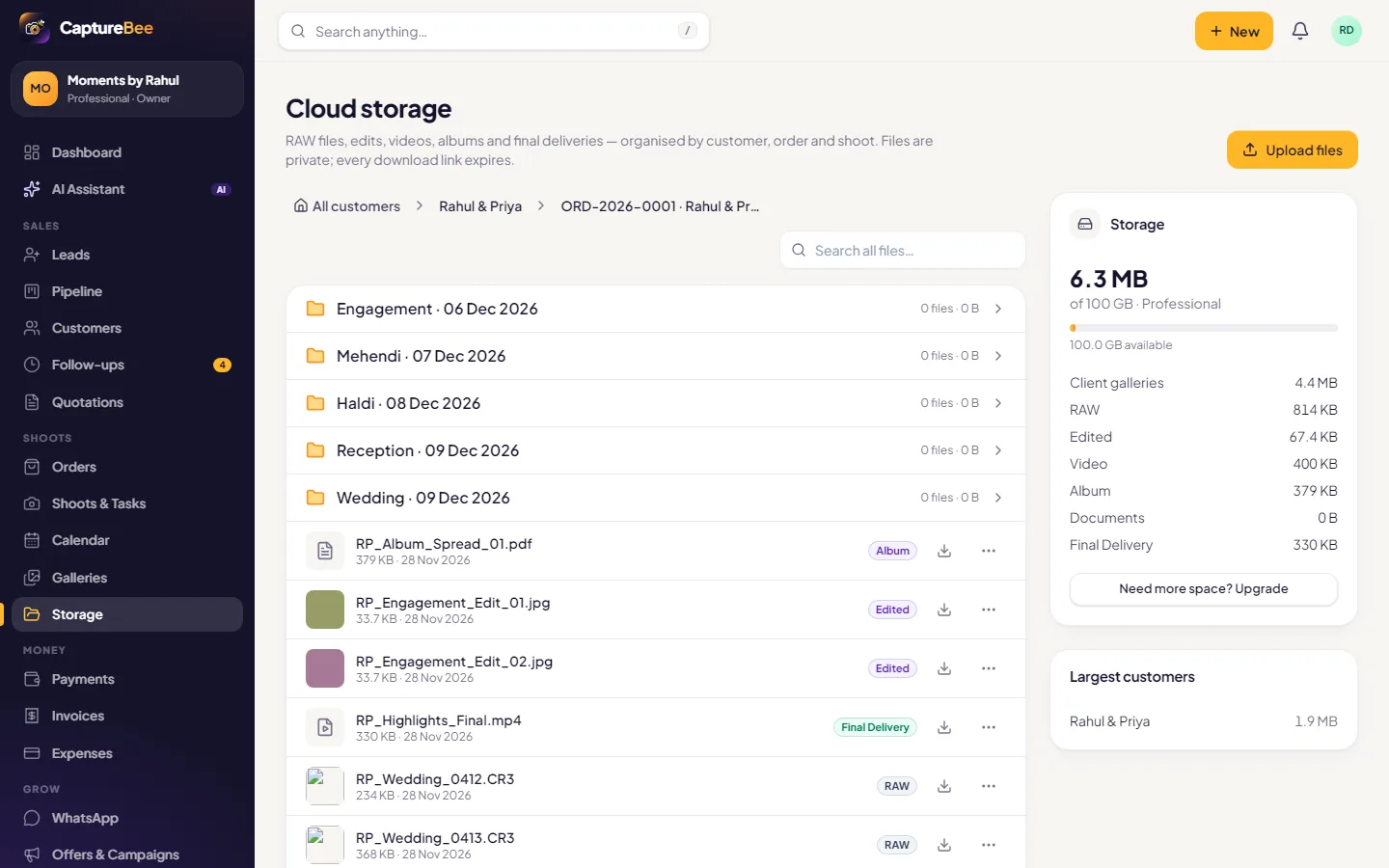
Large files are uploaded in small chunks — up to 2 GB per file — so a dropped connection resumes instead of starting again. Any file type works: RAW, JPEG, MP4, PDF, album designs.
Plan your storage
Photo and video files are big. A wedding with two photographers can easily produce tens of gigabytes of RAW files, and video adds far more. Decide what lives where:
- Keep online what you are actively working on and delivering: selects, edits, final photos and films for recent orders.
- Archive RAW files of completed orders to your own drives once the client has received everything.
- Delete what you no longer need — duplicates, rejected frames, old drafts.
The storage page shows how much space you are using in total, by type (galleries, RAW, edited, video, album, documents, final delivery) and which customers use the most — so you know what to archive when space runs low. Storage depends on your plan.
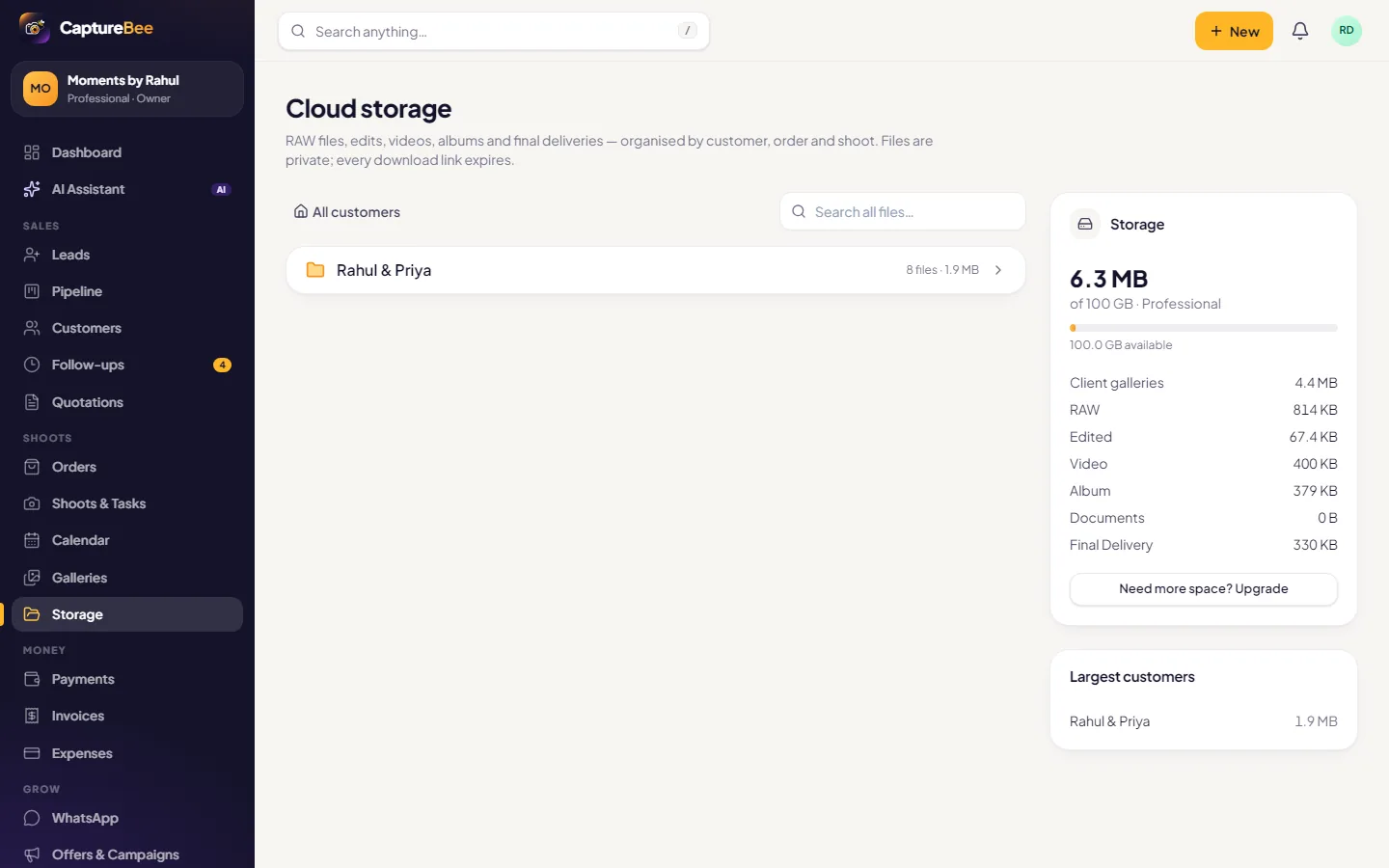
Important: Online storage is for working and delivering, not your only backup. Keep your RAW files on at least two drives of your own — ideally one in a different place — until the order is completely closed.
Two kinds of sharing: proofing and delivery
Most studios share photos twice, for different reasons. Treat them differently.
1. The proofing gallery
Purpose: let the client view and select photos for the album.
- Previews, not originals
- Password on for weddings
- Watermark on if screenshots worry you
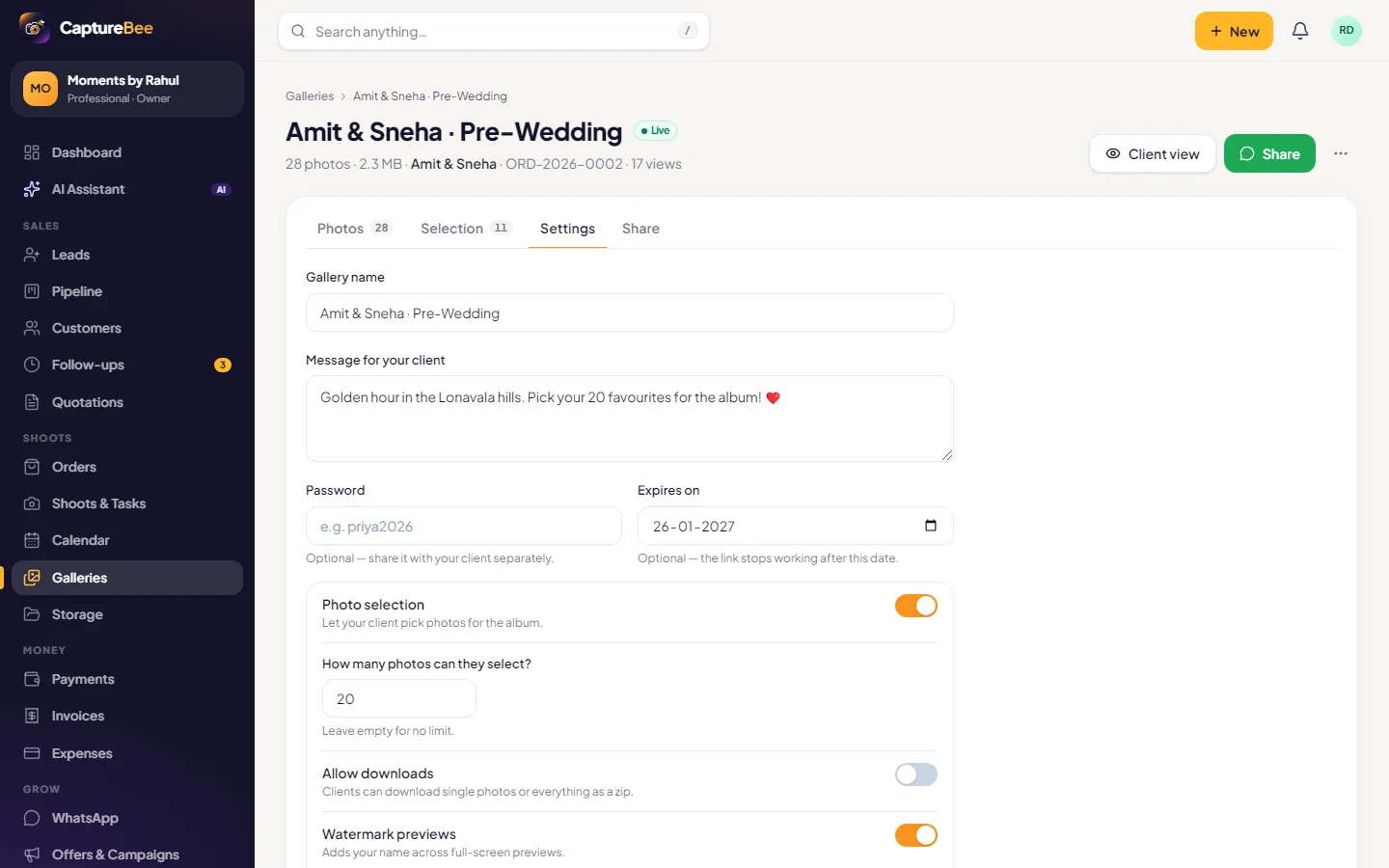
- Downloads off
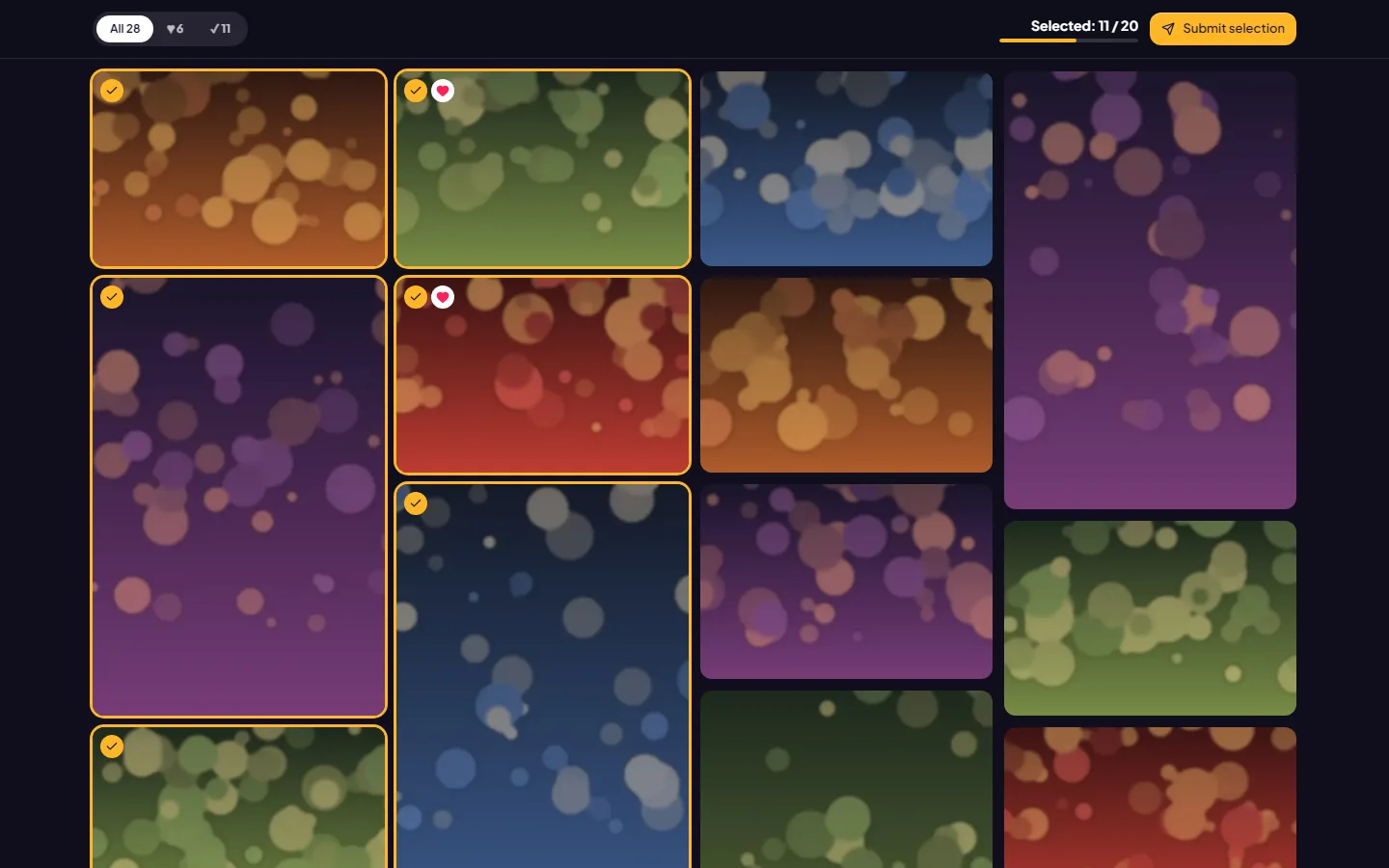
- Selection on, with a limit
- Expiry a few weeks out
This is covered in detail in online photo selection for clients.
2. The final delivery
Purpose: give the client their finished work to keep.
- Full-resolution edited photos and final films
- Easy to download everything at once
- No watermark
- A generous expiry — long enough for the whole family to download
Gallery downloads
If you deliver photos through the gallery itself, each gallery lets you allow downloads (single photos or the whole gallery as a zip) and choose the download size: full resolution, or web size for social sharing. Watermarked previews protect photos while downloads stay off.
One final-delivery link per order
For the finished work, CaptureBee uses a dedicated final delivery. Upload final photos and videos to the order's Final Delivery folder, then create a delivery link with:
- A title — "Rahul & Priya — Your wedding photos and films"
- A message — a personal note from you
- An expiry date — long enough for the family to download everything
The client opens one link and downloads everything — single files or all at once as a zip. You can see how many times the delivery was viewed and downloaded, so you know it actually arrived. Sending the delivery moves the order to Delivered automatically.
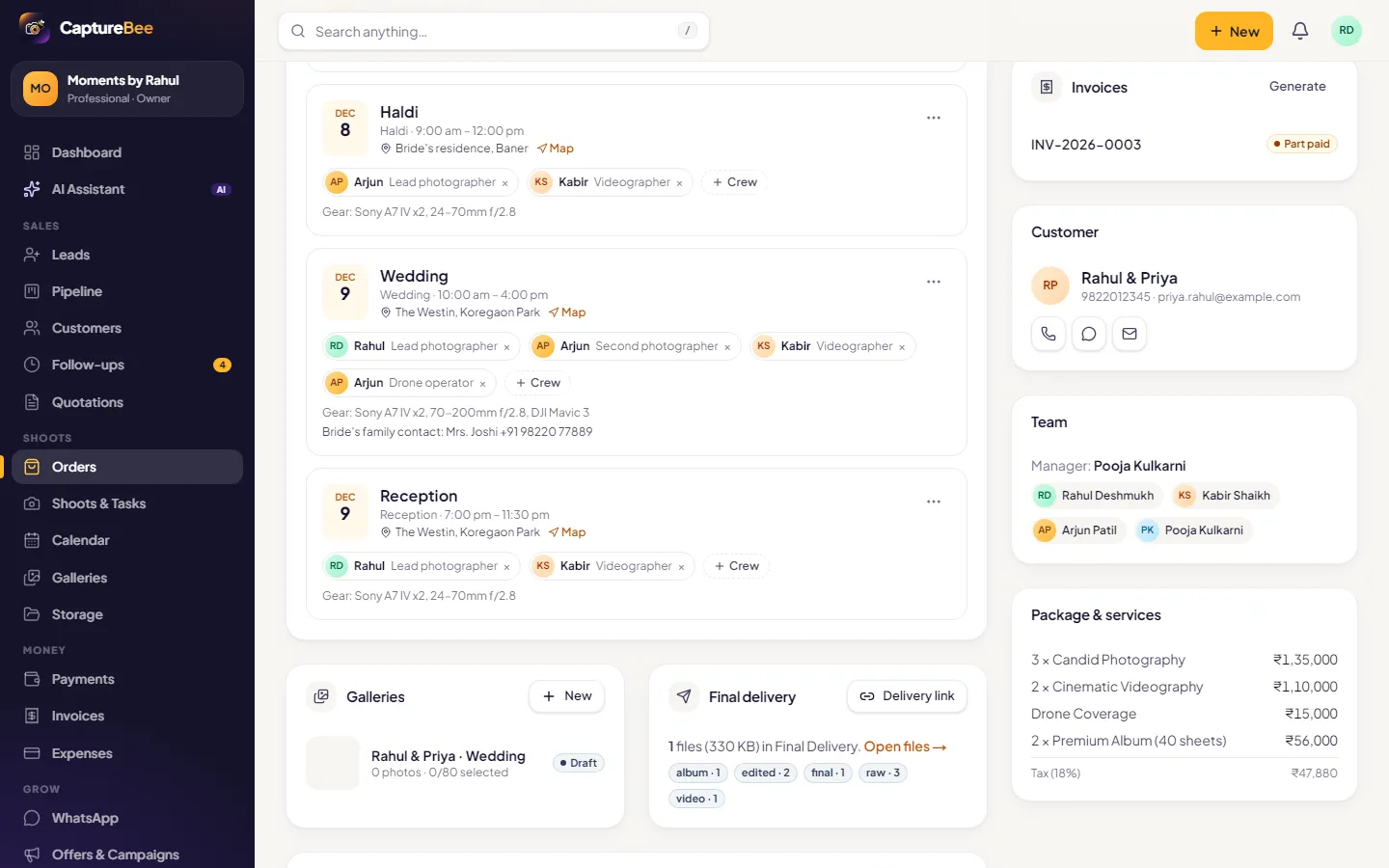
Send it with the Final delivery template:
Hi {{customer_name}}, your final photos and videos from {{business_name}} are ready to download: {{delivery_link}} Thank you for choosing us! ❤️
What about videos?
Upload films to the Final Delivery folder like any other file and they are included in the delivery link for download. Large files are fine — they upload in chunks.
When clients come back later
Months later, a client will ask for their photos again — a new phone, a lost drive, a print for an anniversary. Because everything is filed by customer and order, finding it takes seconds:
- Extend the expiry of the existing delivery or gallery, or
- Create a new delivery link for the order and send it.
If you have archived the files offline, re-upload just the final files to the order and send a new link.
Watermarks: when they help, and when they don't
Watermarks are useful on proofing previews — they discourage screenshots of unedited photos being shared as finished work. On final delivery, they don't belong: the client paid for the photos, and a watermark on their wedding photos is a poor last impression. If you want credit when clients share, ask them to tag you — most will gladly do it.
After delivery
Delivery is the perfect moment for three small things:
- Collect the balance if anything is still due — per your terms, it should already be clear. See tracking advances and dues.
- Ask for a review two days later, when the excitement is highest. CaptureBee does this automatically when an order is completed — see getting more reviews.
- Archive the gallery once selection and delivery are done, to keep your gallery list clean and your active gallery count within your plan.
What to deliver for each type of event
Clients are happiest when delivery matches what was promised — no more, no less, and nothing missing. A typical set:
| Event | Usually delivered |
|---|---|
| Wedding | All edited photos (full resolution + web size), highlight film, full-length film, reels, album design files on request, printed album |
| Pre-wedding | Edited photos, a reel or short film |
| Engagement | Edited photos, short highlight video |
| Birthday / family | Edited photos, optional short video |
| Maternity / newborn | Retouched photos, prints or frames if ordered |
| Corporate | Edited photos within the agreed time, same-day highlights, web-size versions for social media |
Make the list part of your packages and quotations, and check it against the Final Delivery folder before you send the link.
Export settings and file names
A few export habits make your delivery look professional and work smoothly on every device:
- JPEG, sRGB, high quality for photos. Phones and print labs expect sRGB.
- Two sizes if you can: full resolution for printing, and a smaller web size (around 2048 px on the long side) for WhatsApp and Instagram.
- Readable file names: "Rahul-Priya-Wedding-0412.jpg" beats "DSC_0412.jpg". Include the couple's names and the function.
- Group by function or story if you deliver folders — Engagement, Mehendi, Haldi, Wedding, Reception.
- Films in MP4 (H.264) for compatibility; keep a high-quality master for yourself.
- Check a few files on a phone before sending — exactly how most families will see them first.
The gallery's download size option (full resolution or web size) lets clients choose the right files when you deliver through a gallery.
A backup plan that actually protects you
Losing a client's wedding photos is a photographer's worst nightmare — and it almost always happens because there was only one copy at the wrong moment. A simple, widely used rule is 3-2-1: three copies, on two different types of storage, with one copy somewhere else.
In practice, for a photography studio:
- On the day: cameras with dual card slots write to both cards. Don't format cards until they're backed up.
- That night: copy the cards to your computer and to an external drive.
- Within a week: a third copy somewhere else — a second drive kept at home or another location, or a cloud backup.
- During editing: your working files and catalogue are backed up daily.
- For delivery: final files go online to the order's Final Delivery folder, where the client downloads them.
- After the order closes: archive RAW and finals on two drives of your own; free up online space you no longer need.
Online storage in CaptureBee is built for working and delivering — selection galleries, edits, final delivery — not as your only archive. Keep your own backups of everything you can't afford to lose.
Delivery timelines — and what to do when you're late
Clients judge delivery by two things: how long it takes, and whether you did what you said. The second matters more.
Promise realistic timelines in your terms, for example:
- Same-day or next-day highlights for corporate events
- Sneak peeks within a week of the wedding
- Edited photos within 30 days of the event
- Films within 45–60 days
- Albums within 30 days of the client approving the design
Track every stage. Tasks with due dates for editing, film and album, plus the order's status, show at a glance which deliveries are on track.
If you're going to be late, say so early. A message two weeks before the deadline — "The film is taking a little longer because we want the colour grading perfect; you'll have it by the 20th" — is received very differently from silence after the deadline. Send a few sneak-peek photos with it.
Never let the balance wait on silence. If delivery depends on the balance, as most terms say, remind the client before delivery is ready — see collecting advances and tracking dues.
The physical touch
Digital delivery is convenient; a physical touch makes it memorable. A few ideas that cost little:
- A printed QR code from the gallery's Share tab, in the album box or on a thank-you card, so the family can open the gallery any time it's live.
- A handwritten note from the team with the album.
- A small print of the couple's favourite photo with the delivery.
- Album packaging with your branding, so it looks like a gift, not a parcel.
These moments are what clients mention in their reviews — and what they show to their friends.
How long to keep client files — and telling clients
Clients often assume you'll keep their photos forever. You probably won't, and you shouldn't have to. Decide a policy and put it in your terms:
| What | A common policy |
|---|---|
| Online gallery | Available for 4–8 weeks for selection; extended on request |
| Final delivery link | Available for 30–60 days; re-shared on request |
| Edited finals (your archive) | Kept for 1–2 years after delivery |
| RAW files | Kept until the album is delivered and the order is closed, then archived or deleted per your terms |
Tell the client in the delivery message: "Please download everything within 30 days and keep a backup — we keep a copy for a year, but your photos deserve to be safe with you too." It's helpful, honest, and it protects you when someone asks for their files five years later.
When a gallery is about to expire, CaptureBee reminds you, so you can extend it or nudge the client to finish downloading.
When delivery doesn't go smoothly
A few problems come up often. Here's how to handle them calmly.
"The link isn't opening." Check that the link hasn't expired, and that the client is using the full link (WhatsApp sometimes breaks long links across lines). Re-send it from the delivery or gallery's share options. If it's a password-protected gallery, re-send the password separately.
"The download is too slow / keeps failing." Large zips can fail on mobile data. Suggest downloading on Wi-Fi from a laptop, or downloading folders or single files instead of everything at once.
"I downloaded on my iPhone but can't find the photos." Files downloaded in a browser on iPhone often go to the Files app rather than Photos. Tell them to look in Files → Downloads, then save the photos to Photos from there — or download on a laptop first.
"Some photos are missing." Check the Final Delivery folder against your list. If the client means photos that weren't in their selection, explain gently what the package includes, and offer extras at your usual rate.
"Can you send it to my parents too?" Forward the same delivery link — it's built for sharing with family — and consider extending the expiry so everyone has time.
"Can we have the RAW files?" Most photographers don't deliver RAW files: they're unedited and represent your work in progress. Say so kindly, and point to your terms.
Step by step in CaptureBee
- Open the order → Storage. Shoots appear as folders.
- Upload RAW, edited, video and album files to the right folder type.
- Proofing: create a gallery with a password, watermark, selection limit, downloads off.
- Final files: upload them to the Final Delivery folder.
- Create the delivery link with a title, message and expiry.
- Send it on WhatsApp with the Final delivery template.
- Check views and downloads; extend the expiry if the family needs more time.
- Archive RAW files to your own drives once the order is complete.
Mistakes to avoid
- "Anyone with the link" folders that never expire. Private moments deserve better.
- Delivering unsorted folders. Organise by function and type; name things for humans.
- Watermarks on final photos. Ask for a tag instead.
- One copy of RAW files. Online storage is not a backup plan on its own.
- Short expiries for big deliveries. Families download slowly; give them time.
- Not knowing if it arrived. Check that the delivery was opened.
Delivering to corporate clients
Corporate delivery works differently from weddings. Speed, formats and usage matter more than emotion.
- Same-day highlights. For conferences and launches, a set of 20–40 edited photos the same evening is often worth more to the client than the full set a week later. Agree the number and the deadline in the quotation.
- Web-ready and print-ready sizes. Marketing teams want small files for social media and press, and large files for print. Deliver both, clearly labelled.
- Folders by session. For multi-session events — keynote, panels, awards, networking — organise final files by session so the client's team finds what they need in seconds.
- Captions and names. If the client needs speakers or award winners named, agree beforehand who provides the names and in what form.
- Usage rights. State in your terms how the company may use the photos — internal, social media, advertising — and whether you may use them in your portfolio. Large brands often have their own requirements; agree them before the event.
- One link for the whole team. A final-delivery link with a clear title ("TechNova Product Launch — Photos, 28 Oct") can be forwarded inside the company; set an expiry that suits their review process.
- Invoice with delivery. Send the invoice the same day the photos go out — see invoices and receipts for photographers.
Corporate clients who get fast, well-organised delivery tend to come back for every event — and recommend you to their agencies.
A delivery message that delights
The delivery message is the last thing you write to a client about their event. Make it feel like a gift, not a link:
Hi Kavya & Rohan, it's here! 💛 Your wedding photos and film are ready — every moment from the haldi to the last dance at the reception. Download everything here: {{delivery_link}}
The link is open for 30 days, so please save everything and keep a backup. Your printed album is on its way too.
Thank you for trusting us with your day. It was a joy. — Rahul & team
What makes it work: their names, a reminder of the moments inside, the practical details (the link, how long it's open, the backup), and genuine thanks. Send it when the couple can sit down together and open it — a weekday evening or a weekend morning.
Then, two days later, ask for the review.
Quick checklist
- Files are filed by customer, order and function, and tagged by type
- RAW files are backed up on at least two drives of your own
- Proofing galleries use passwords, watermarks and no downloads
- Final files go into the order's Final Delivery folder
- One delivery link per order, with a title, message and generous expiry
- The delivery message says how long the link is open and asks clients to keep a backup
- You check that the delivery was opened
- Your file-keeping policy is in your terms
- The review request goes out two days later
Frequently asked questions
What is the best way to deliver photos to clients?
A single private link with all the final photos and videos, downloadable individually or as one zip, with an expiry long enough for the family to download everything — and a way to re-send it later.
Can I password-protect a client gallery?
Yes. Each gallery can have its own password, which you share with the client separately.
Do delivery links expire?
Yes. You set the expiry date on galleries and deliveries, and you can extend it any time. Individual file links also expire after a short time, so forwarded image links stop working.
Can I deliver videos through CaptureBee?
Yes. Upload videos to the order's Final Delivery folder and they're included in the delivery link for download.
Can clients download everything at once?
Yes. Clients can download single files or everything as a zip — from a final delivery, or from a gallery where downloads are allowed.
How much storage do I get?
It depends on your plan — see pricing. The storage page shows your usage by type and by customer.
Finish as well as you started
The client's last experience of your work should feel as considered as the first: one beautiful, private link with everything they need, in full resolution, and enough time to download it — with your files safely organised and backed up behind the scenes.
Start a free CaptureBee trial and send your next final delivery as one private link. Read next: how photographers get more reviews.