Here's a question many photographers can't answer quickly: how much profit did you make last month? Not how many shoots you did, not how much came into your account — how much you actually kept after paying second shooters, editors, album printers, travel, software and rent.
Wedding season feels profitable because it is busy. But busy is not the same as healthy. A full calendar can hide unpaid balances, freelancer costs that ate the margin, a popular package that barely breaks even, and an Instagram budget that brought likes but no bookings.
This guide covers the handful of numbers that tell you whether your photography business is healthy, how to track them without spreadsheets, what each one tells you to do, and how CaptureBee analytics puts them on one screen.
The seven numbers that matter
You don't need fifty metrics. These seven tell you almost everything:
| Number | What it is | What it tells you |
|---|---|---|
| Revenue | Payments received in a period | How much money came in |
| Expenses | What you spent in the same period | Where the money went |
| Profit | Revenue minus expenses | What you actually kept |
| Lead conversion | Booked leads ÷ all leads | How well you sell |
| Average order value | Total order value ÷ number of orders | How much each booking is worth |
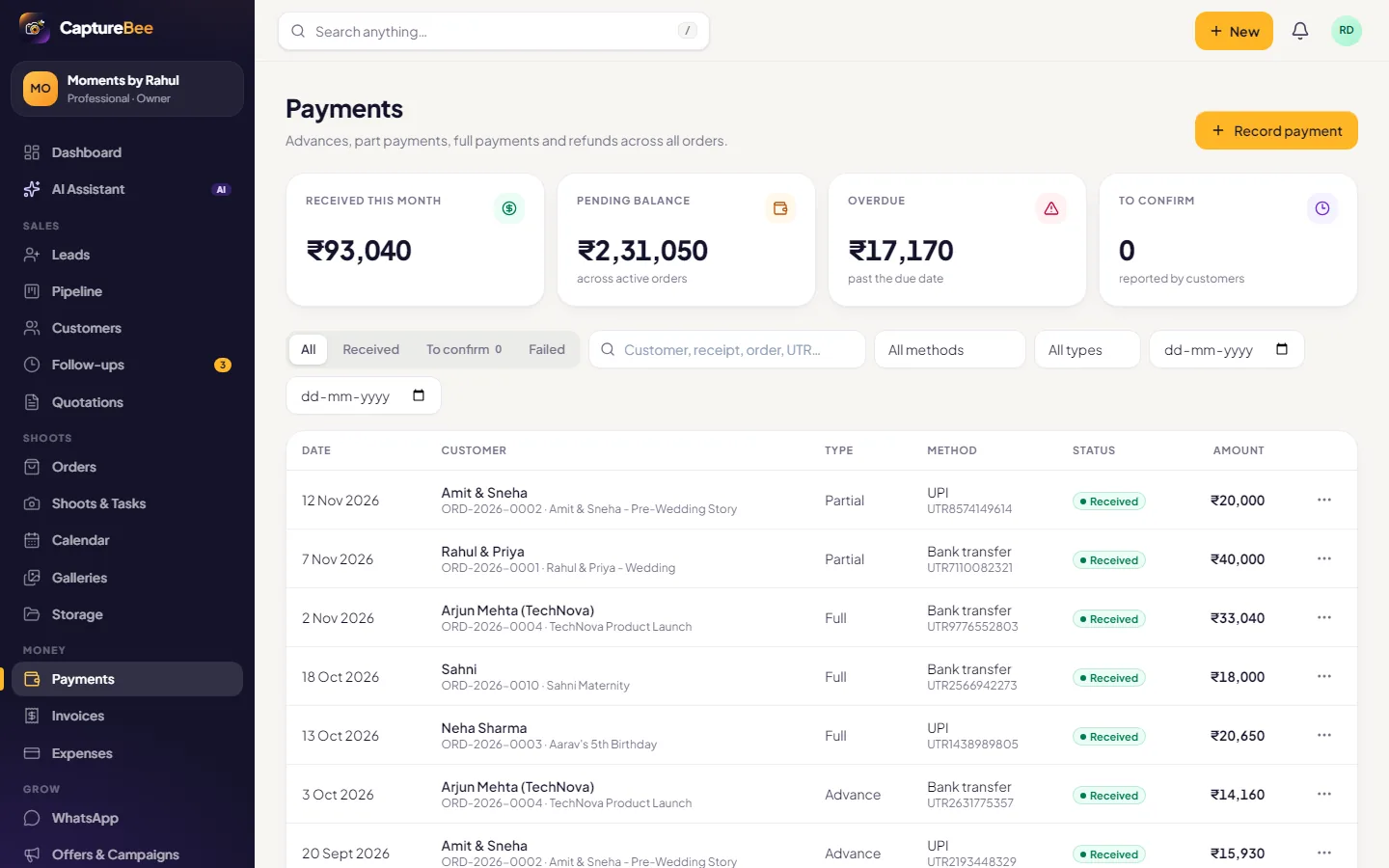
| Pending payments | Balances still owed across active orders | Money you've earned but not received |
| Repeat customers | Customers who booked more than once | How well you keep clients |
Two more are useful for photographers specifically: gallery views (are clients engaging with their galleries?) and storage used (are you about to run out?).
Revenue: count what came in
The simplest definition for a small business: revenue is payments received in the period, minus refunds. Not quotations sent, not orders booked — money actually received.
This only works if every payment is recorded against an order with its date: advances, part payments, balances, cash at the venue. That's why tracking advances and dues comes first — analytics is only as good as the payments behind it.
Photography revenue is seasonal. Compare each month with the same month last year where you can, and look at 6- or 12-month trends rather than reacting to one quiet month.
Expenses: the half most photographers skip
Most photographers know roughly what came in. Far fewer know what went out. Record expenses as they happen, by category:
| Category | Examples |
|---|---|
| Equipment | Bodies, lenses, flashes, repairs |
| Travel | Fuel, tickets, hotel for out-station weddings |
| Freelancers | Second shooters, videographers, editors |
| Printing | Prints, frames |
| Albums | Album printing and binding |
| Marketing | Instagram ads, website, wedding fairs |
| Studio rent | Rent, electricity |
| Software | Editing software, subscriptions |
| Cloud storage | Backup and storage plans |
| Other | Everything else |
In CaptureBee, record an expense with a date, category, amount, vendor, description and payment method — and link it to an order when it belongs to one (the freelancer for the Sharma wedding, the album for Amit & Sneha). The Expenses page shows the month's revenue, expenses and profit side by side, with a breakdown of where the money went.
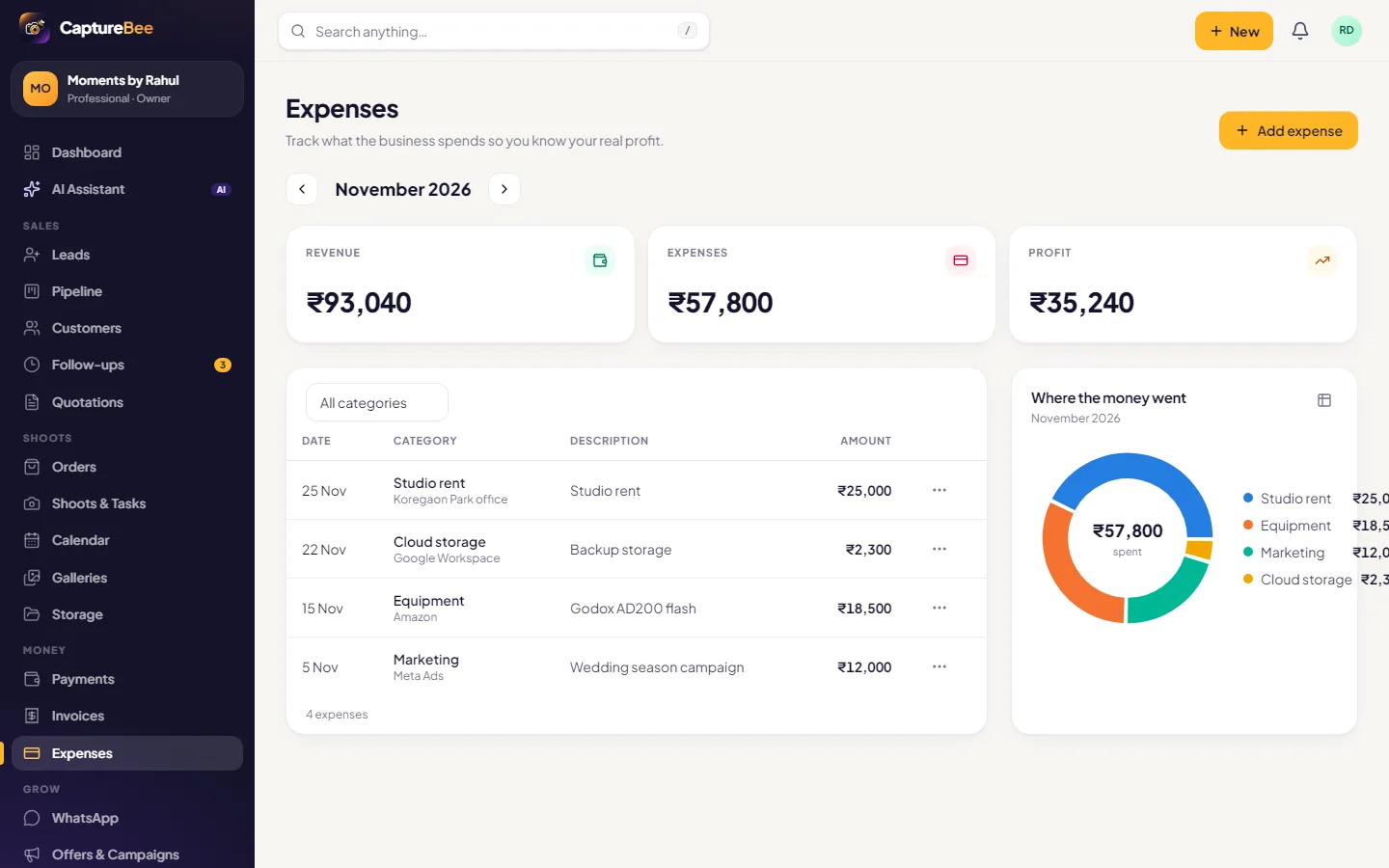
Tip: Record expenses the day they happen, from your phone. At the end of the month, nobody remembers the ₹2,300 storage bill or the ₹1,800 fuel for the pre-wedding shoot.
Profit: the number that pays you
Profit = revenue − expenses. It's simple, and it changes how you see your business.
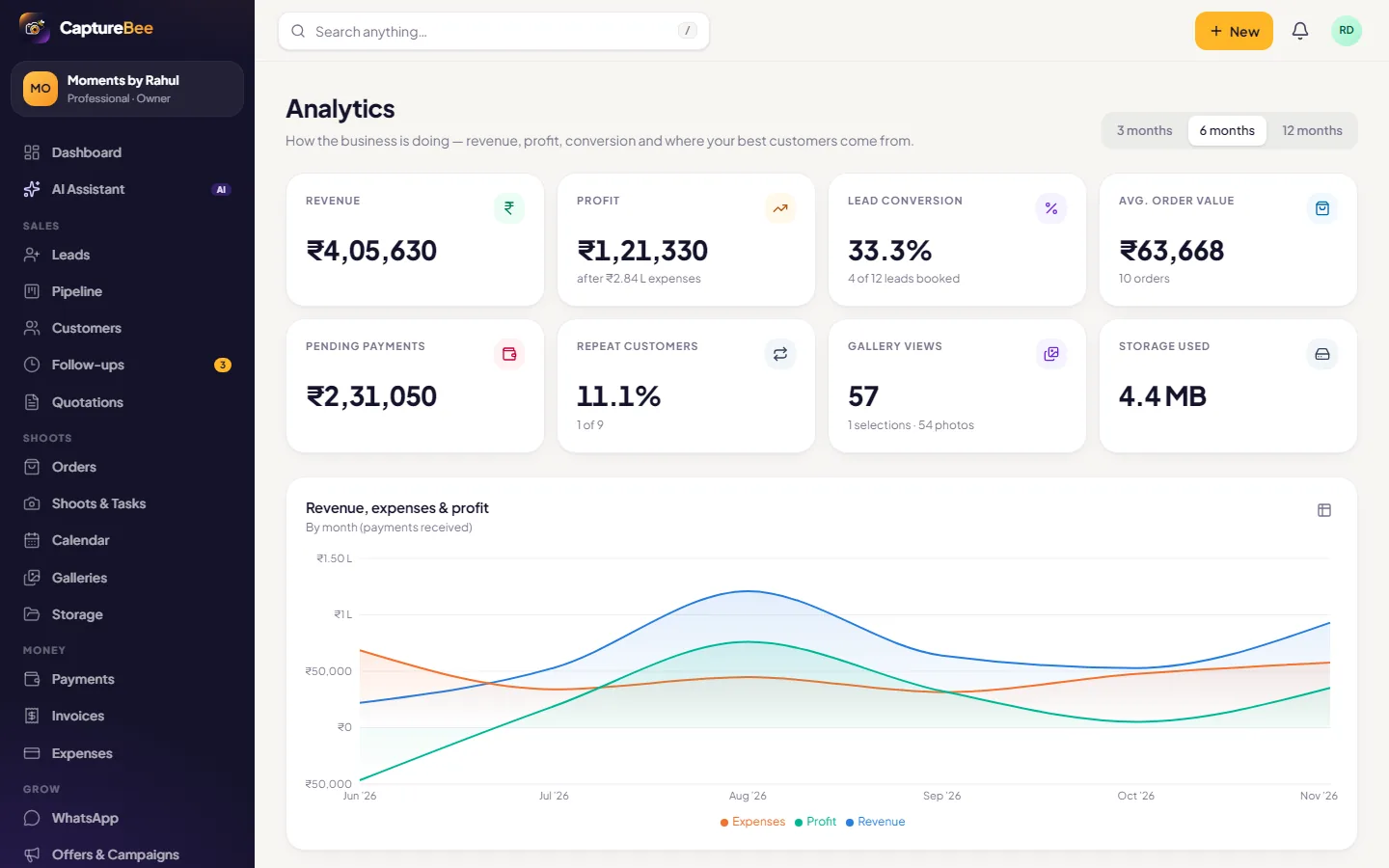
Look at profit by month: the analytics chart shows revenue, expenses and profit together for 3, 6 or 12 months. Patterns appear quickly — the month with the most weddings may not be the most profitable if you hired three freelancers and paid for out-station travel.
Then look at profit by type of work. Linking expenses to orders shows what each booking really cost. You may find that weddings bring the revenue, but pre-wedding and maternity shoots bring the margin — which should change what you promote.
Lead conversion: how well you sell
Conversion = leads booked ÷ total leads. If 12 enquiries came in and 4 booked, conversion is 33%.
Conversion tells you where to work:
- Low conversion overall — look at how fast you reply, how you follow up, how clear your quotations are. See managing photography enquiries and quotations clients accept online.
- Low conversion from one source — that channel brings the wrong people, or the wrong expectations.
- High conversion but few leads — you sell well; spend on getting more enquiries.
Conversion by source
This is one of the most useful reports a photographer can have. CaptureBee shows, for each lead source — website, Instagram, referral, Facebook, phone, WhatsApp, Google — how many leads came in, how many booked, and the conversion rate.
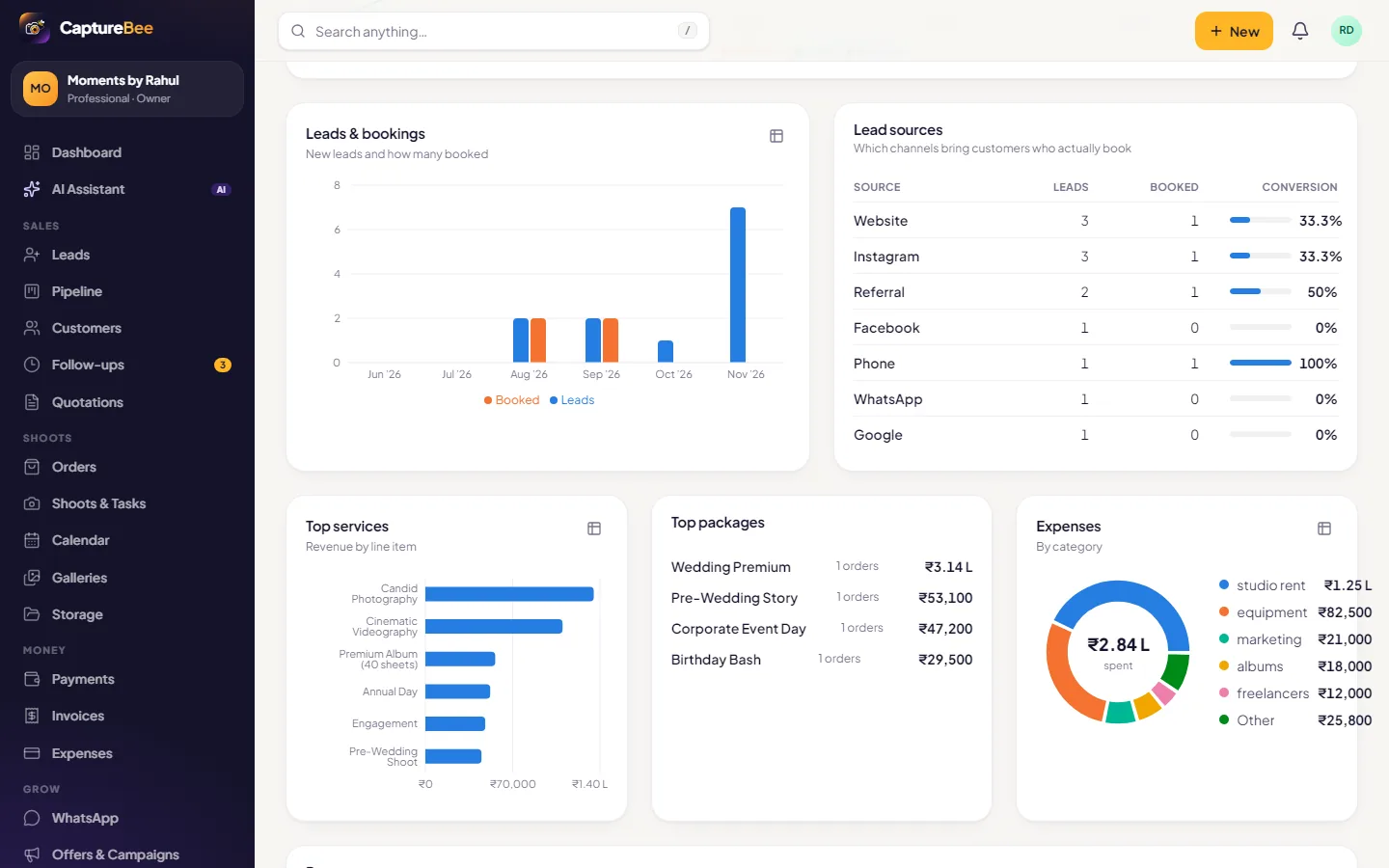
If referrals convert at 50% and Instagram at 10%, a referral programme may be worth more than another month of ads.
Average order value: grow without more weddings
Average order value (AOV) is what a typical booking is worth. Raising it is often easier than finding more clients:
- Make your mid-tier package the obvious choice
- Offer relevant add-ons — drone, reels, an extra album, a pre-wedding shoot
- Bundle a pre-wedding shoot into wedding packages
- Review prices every season
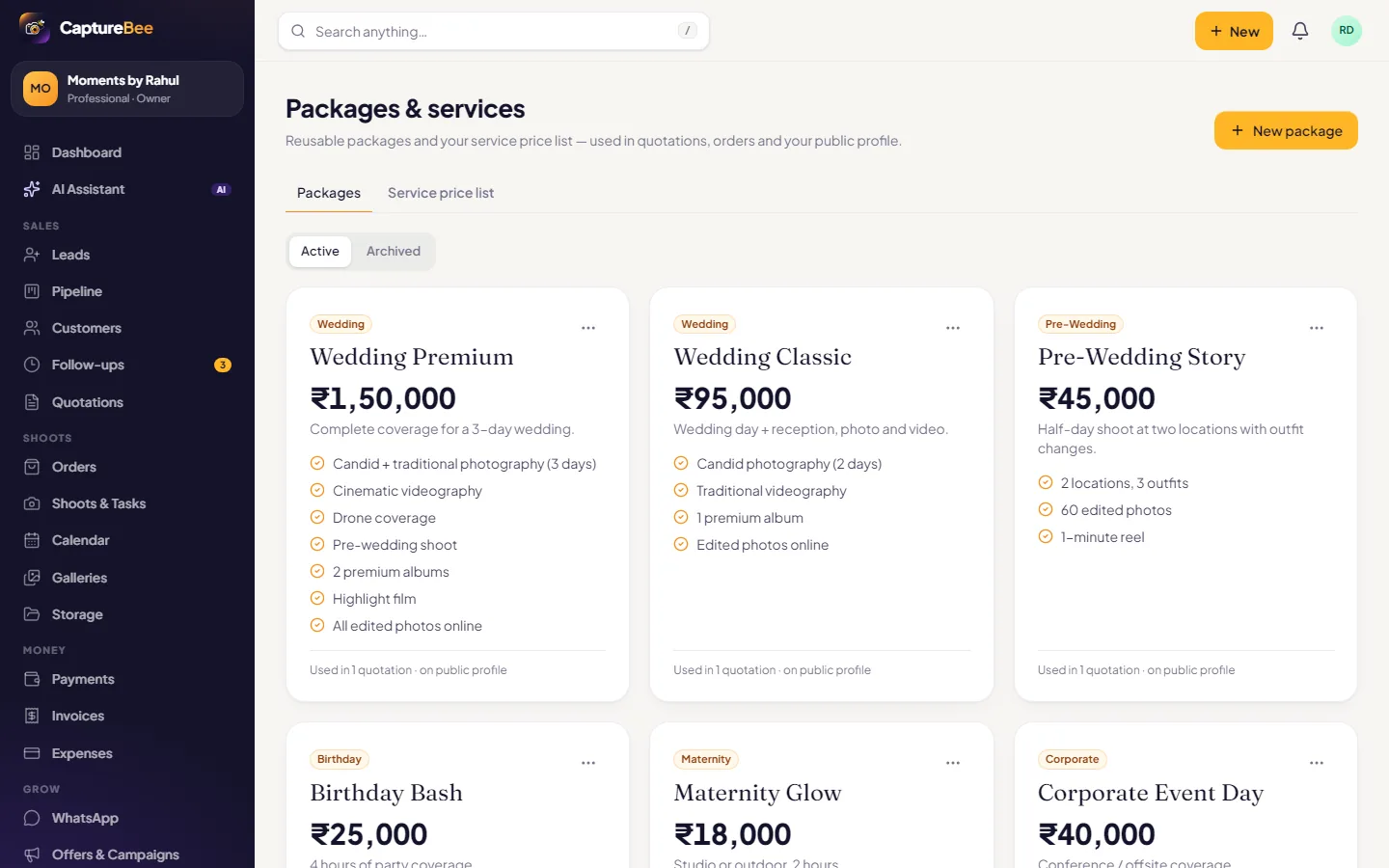
Top services and top packages by revenue show what actually sells. See building packages and pricing that sell.
Pending payments: money you've earned but don't have
Pending payments are balances still owed across your active orders. They are easy to ignore in a busy season — and painful at the end of it.
Watch two numbers:
- Pending balance — everything still to come
- Overdue — balances past their due date
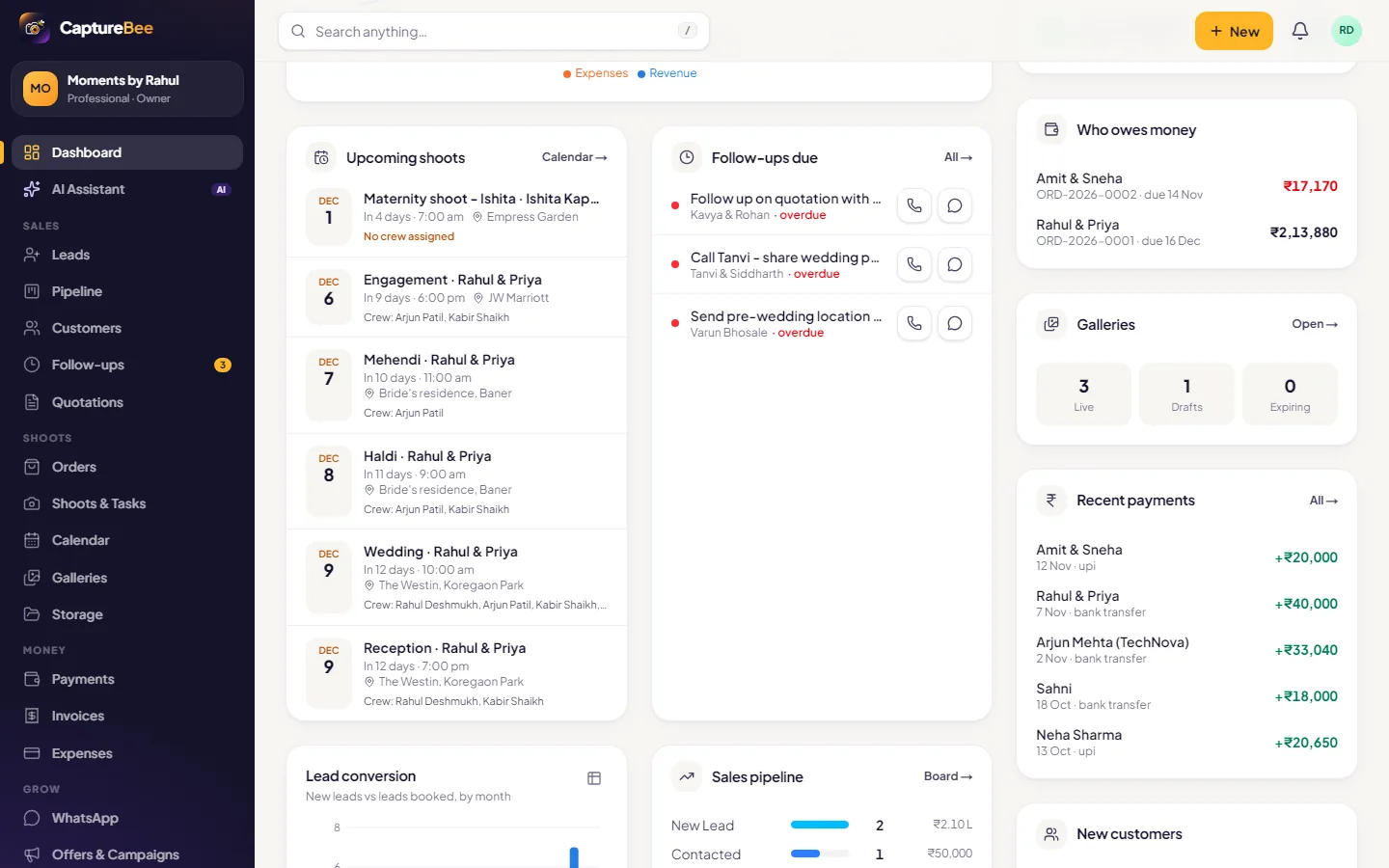
The dashboard's Who owes money card lists the customers with balances, the order and the amount, so you know who to remind today. Automated reminders two days before each due date keep this number small.
Repeat customers: the cheapest bookings you'll get
A family who booked you for a wedding may book a maternity shoot, a newborn shoot, a first birthday — and recommend you to every cousin. Repeat customers tells you how many clients came back.
If it's low, stay in touch: a thoughtful offer once or twice a year through a campaign, tags on your best clients, and a review request after every job. See how photographers get more reviews.
The dashboard: your daily view
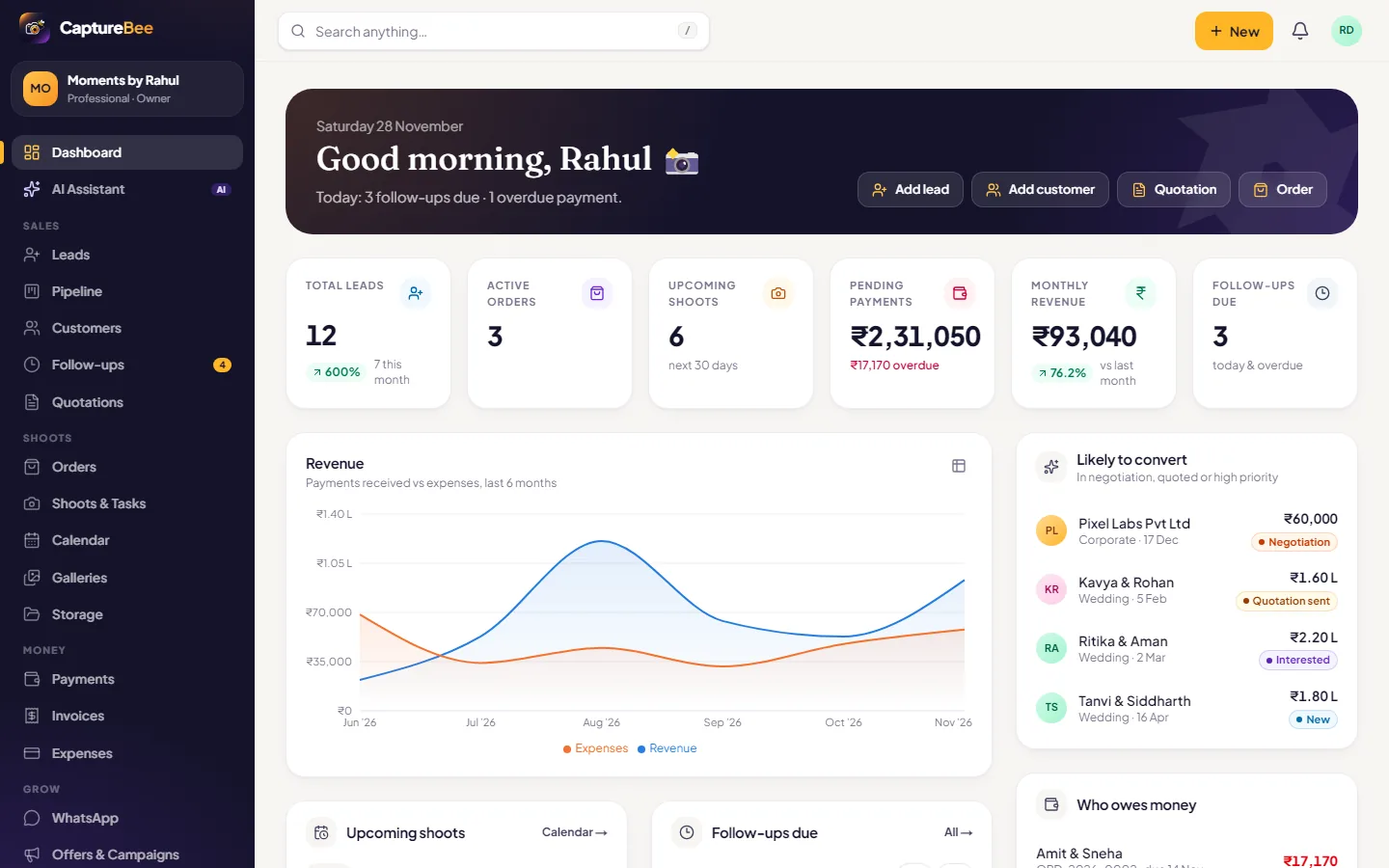
Analytics is for monthly decisions. The dashboard is for today. It greets you with what needs attention — follow-ups due, overdue payments — and shows:
- Total leads, active orders, upcoming shoots
- Pending payments, with how much is overdue
- Monthly revenue against last month
- Follow-ups due today
- A revenue chart for the last six months
- Likely to convert — leads in negotiation, quoted or high priority
- Upcoming shoots, follow-ups due, who owes money, galleries, recent payments, lead conversion, the sales pipeline and new customers
A monthly 20-minute review
Once a month, sit down with your numbers:
- Revenue vs last month and last year — what changed?
- Expenses by category — anything unusual? Freelancers higher than expected?
- Profit — up or down, and why?
- Pending and overdue — who needs a call this week?
- Conversion by source — where should next month's effort go?
- Top packages — what's selling, and is it priced right?
- One decision — raise a price, drop a package, double down on a channel, chase three balances.
Exports for your accountant
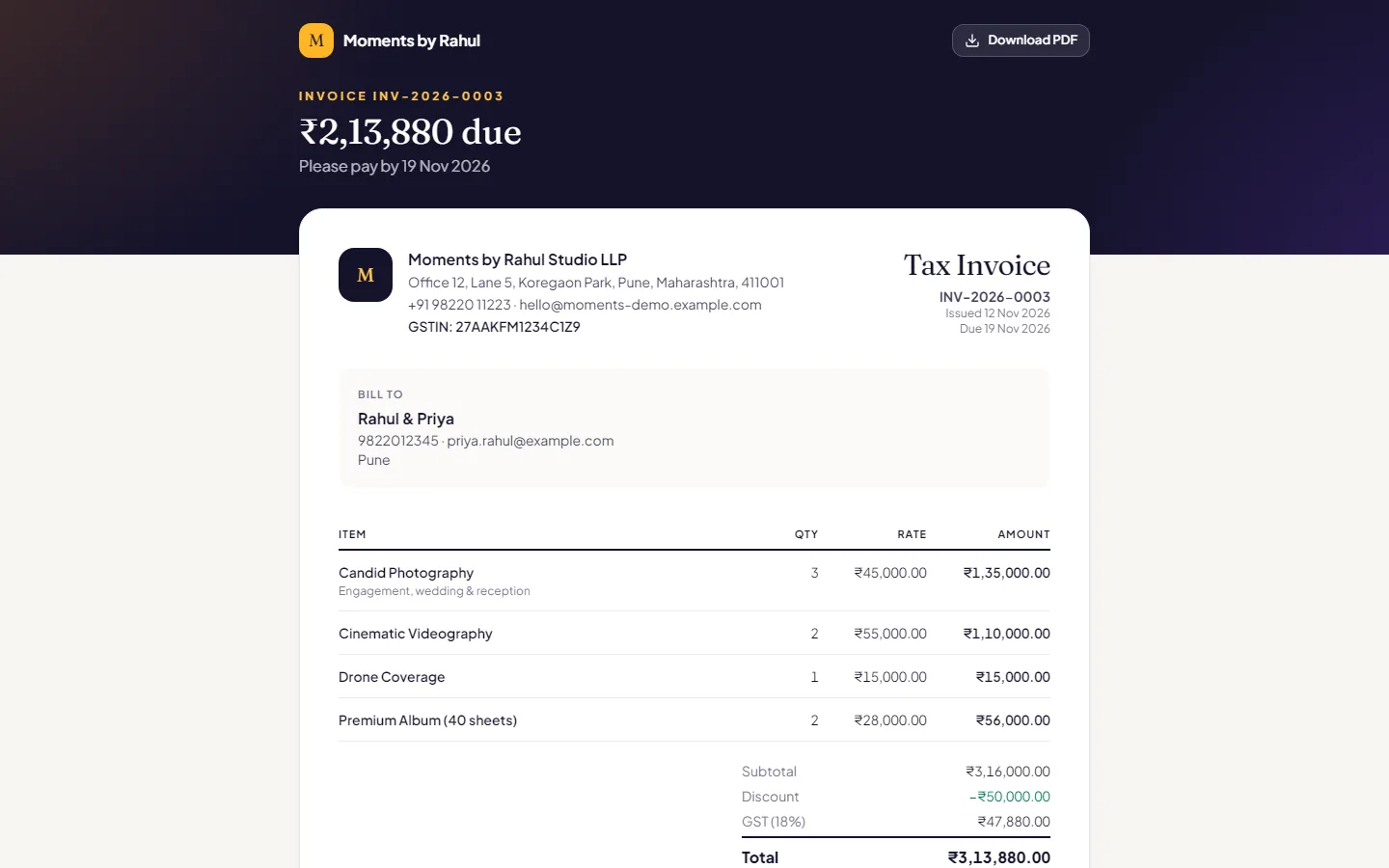
Plans with report exports can download reports as CSV for your accountant or your own spreadsheets. Your accountant can also log in with the Accountant role to see payments, invoices, expenses and reports directly — see invoices and receipts for photographers.
Ask your numbers a question
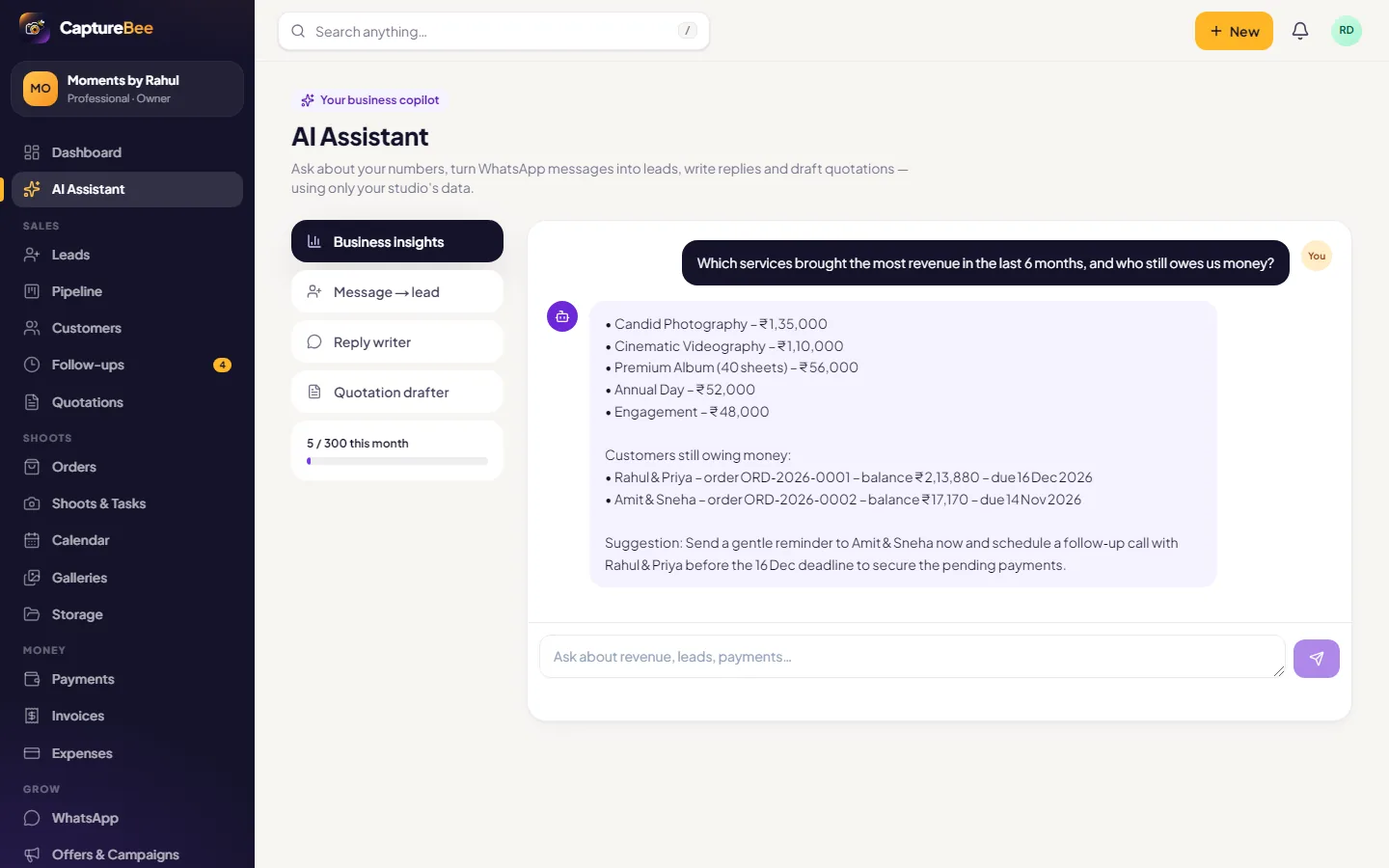
Sometimes you just want an answer: "Which services made the most money in the last six months, and who still owes us?" CaptureBee's AI assistant answers questions like this from your own studio's data, with a practical suggestion at the end. See an AI assistant for your photography studio.
A worked example: one month at a small studio
Numbers make more sense with an example. Here's November for a small Pune studio — the owner, two regular freelancers and an editor.
Revenue (payments received): ₹93,040
| Payment | Amount |
|---|---|
| Pre-wedding — part payment | ₹20,000 |
| Wedding — second instalment | ₹40,000 |
| Corporate event — balance | ₹33,040 |
Expenses: ₹57,800
| Category | Amount |
|---|---|
| Studio rent | ₹25,000 |
| Equipment (flash) | ₹18,500 |
| Marketing (Instagram ads) | ₹12,000 |
| Cloud storage | ₹2,300 |
Profit: ₹35,240
What does the owner learn?
- Revenue is lumpy. Most of it came from one wedding instalment and one corporate balance. A big December wedding season is coming, but November alone looks thin.
- ₹2,31,050 is still pending across active orders, ₹17,170 of it overdue. Collecting the overdue amount this week matters more than any marketing.
- The flash was a one-off. Without it, profit would be ₹53,740. Big equipment purchases are better judged over the year than in the month they happen.
- ₹12,000 on Instagram ads — did it bring leads? The lead sources report shows Instagram brought three leads this period and one booking. Worth continuing, but worth watching.
The point isn't to panic about one month. It's to see clearly, so the next decision — chase the overdue balance, keep or pause the ads — is based on facts.
Setting targets: work backwards from what you want to earn
Many photographers set goals like "more weddings next year". A target is more useful when it starts from what you actually want to earn.
1. Decide your income goal. Say you want ₹12 lakh a year in profit for yourself.
2. Add your yearly expenses. Rent, software, storage, marketing, equipment replacement and freelancers — say ₹10 lakh.
3. That's your revenue target: ₹22 lakh.
4. Divide by your average order value. If your average booking is ₹65,000, you need about 34 bookings in the year.
5. Work out the leads you need. At a 30% conversion rate, 34 bookings need about 113 leads — roughly 9–10 enquiries a month, more in the months before wedding season.
Now the goal is concrete, and you can see which lever is easiest to pull:
- More leads — more marketing, more referrals, a better profile
- Better conversion — faster replies, better follow-ups, clearer quotations
- Higher order value — better packages and add-ons
- Lower costs — fewer freelancer days, cheaper album suppliers, cancelled subscriptions
A 10% improvement in each of conversion and order value often beats doubling your marketing spend.
Profit per type of work
Not all bookings are equally profitable. Compare by type, using expenses linked to orders:
| Type | Typical order | Direct costs | Your hours | Profit per hour |
|---|---|---|---|---|
| 2-day wedding | ₹1,60,000 | ₹70,000 | 60 | ₹1,500 |
| Pre-wedding | ₹45,000 | ₹8,000 | 14 | ₹2,640 |
| Corporate event | ₹40,000 | ₹6,000 | 12 | ₹2,830 |
| Maternity session | ₹18,000 | ₹2,500 | 6 | ₹2,580 |
(The figures are illustrative — use your own.) Weddings bring the biggest cheques, but smaller shoots may earn more per hour. That might mean filling weekdays with corporate and portrait work, raising wedding prices, or reducing editing time per wedding.
Top services and top packages in analytics show which work brings the revenue; your expenses show what it costs.
Planning for the off-season
Photography income is seasonal: a rush of weddings for a few months, then quieter periods. Healthy studios plan for the quiet months while the busy ones are happening.
- Know your fixed monthly costs — rent, salaries, software, loan EMIs. That's what the quiet months must cover.
- Set balance due dates across months, so payments don't all arrive at once and then stop.
- Keep a reserve of at least three months of fixed costs from peak-season profit.
- Fill quiet months on purpose — pre-wedding shoots for couples booked for the next season, maternity and family portraits, corporate work, product photography.
- Run off-season campaigns to past clients and lost leads with a time-bound offer. See automations and campaigns.
- Do the slow work then — update your portfolio and profile, review prices, service your gear, learn something new.
Looking at 12 months of revenue, expenses and profit on one chart makes the seasonal pattern obvious — and makes the plan for next year much easier.
Reading the analytics page, chart by chart
The analytics page answers a different question in each section. Here's what to look for in each one.
The summary cards. Revenue, profit, lead conversion, average order value, pending payments, repeat customers, gallery views and storage — with the period you choose (3, 6 or 12 months). Look for direction more than size: is profit rising while revenue stays flat (good — costs are under control), or revenue rising while profit falls (costs are growing faster)?
Revenue, expenses and profit by month. Three lines on one chart. The gap between revenue and expenses is your profit. Watch for months where expenses spike without a matching revenue spike — usually equipment, or freelancers paid before the client's balance arrived.
Leads and bookings by month. Two bars per month. If leads rise but bookings don't, your sales process is the bottleneck. If both fall, it's your marketing or the season.
Lead sources. For each source, leads, bookings and conversion. This is where you decide where to spend time and money next month.
Top services. Revenue by line item. Tells you what clients actually pay for — often candid photography and films lead, while add-ons like drone are smaller than you'd think.
Top packages. How many orders and how much revenue each package brought. If one package dominates, it's either your sweet spot or priced too low.
Expenses by category. A breakdown of where the money went. Freelancers and studio rent are usually the biggest; marketing is the one most worth checking against results.
Each chart has an export option on plans with report exports, if you'd like to work with the numbers in a spreadsheet.
Your numbers in the first year vs later
What matters most changes as the business matures.
In your first year, focus on:
- Lead sources — find the one or two channels that work.
- Conversion — learn to reply, quote and follow up well.
- Expenses — know your real costs before you set next year's prices.
- Reviews — every happy client is future marketing.
In years two to four, focus on:
- Average order value — better packages and add-ons.
- Profit per type of work — do more of what pays best.
- Repeat and referral customers — cheaper than new marketing.
- Pending payments — as volume grows, so does money owed.
For an established studio, focus on:
- Team costs versus revenue per booking.
- Capacity on peak dates — turning away weddings may mean it's time for a second team or higher prices.
- Seasonal cash flow and reserves.
- Price increases each season, guided by demand.
A yearly review in one hour
Once a year — ideally just before your busy season — spend an hour with 12 months of numbers:
- Revenue, expenses and profit for the year, and how they compare with last year.
- Your best and worst months, and why.
- Top three lead sources by bookings, not by enquiries.
- Top packages — keep, change, or retire each one.
- Average order value — set a target for next year.
- Biggest expense categories — one thing to cut or renegotiate.
- Repeat and referral bookings — one thing to grow them.
- Next year's targets, worked backwards from your income goal.
- Next year's prices, decided now — before the first enquiry of the season.
Write the decisions down. Next year, start your review by checking them.
Mistakes to avoid
- Confusing bookings with revenue. Money received is revenue; orders booked are promises.
- Not recording expenses. Without them, "profit" is a guess.
- Ignoring pending balances. Busy seasons hide them until they're old.
- Judging a channel by enquiries alone. Look at bookings and conversion, not leads.
- Reacting to one month. Photography is seasonal; look at trends.
- Never raising prices. If your best package always sells out, it may be too cheap.
Simple health checks you can do in five minutes
A few ratios tell you whether things are on track, without any accounting knowledge. Work them out monthly, or at the end of each season.
1. Pending payments as a share of monthly revenue. Pending balance ÷ average monthly revenue. If you're owed three or four months of revenue, too much of your business is on credit — tighten balance timing and reminders.
2. Freelancer cost per booking. Freelancer expenses ÷ number of bookings delivered. If it's rising faster than your prices, either your packages include too much crew or your rates need to rise.
3. Marketing cost per booking. Marketing spend ÷ bookings from paid channels. Example: ₹12,000 on Instagram ads that produced one booking worth ₹53,100 is a cost of ₹12,000 per booking — fine for a wedding, not for a ₹15,000 portrait session. Compare channels on this number, not on likes.
4. Overdue share. Overdue amount ÷ pending balance. If more than a fifth of what you're owed is overdue, reminders aren't reaching people at the right time — or your terms aren't clear enough.
5. Discount rate. Total discounts ÷ subtotals on accepted quotations. If you're giving away 10–15% on average, look at how you present prices and negotiate before you raise list prices.
6. Repeat and referral share. Bookings from repeat clients and referrals ÷ all bookings. A rising share means your reputation is doing the selling — the healthiest sign of all.
None of these needs special software — but when payments, expenses, discounts and lead sources are all recorded in one place, each takes a minute instead of an evening.
Plain-English glossary
A few terms that often get mixed up:
- Bookings (or orders booked): the value of work clients have agreed to. A promise, not money.
- Revenue: money actually received in a period, minus refunds.
- Pending balance: money clients still owe on active orders.
- Overdue: pending balances past their due date.
- Expenses: money you spent running the business in the period.
- Profit: revenue minus expenses for the same period.
- Conversion rate: the share of leads that became bookings.
- Average order value (AOV): the average value of a booking.
- Repeat customer: a customer who booked more than once.
- Lead source: where an enquiry came from — Instagram, a referral, your profile and so on.
- Direct costs: costs for a specific booking — freelancers, album, travel.
- Fixed costs: costs you pay regardless of bookings — rent, software, storage.
Keeping these straight avoids the most common money mistake in photography: treating a busy booking calendar as money in the bank.
Quick checklist
- Every payment is recorded against an order on the day it arrives
- Every expense is recorded the day it happens, with a category
- Freelancer, album and travel costs are linked to their orders
- You look at revenue, expenses and profit once a month
- You check pending and overdue balances every week
- You compare lead sources by bookings, not by enquiries
- You review packages and prices once a season
- You keep a reserve for the off-season
- Your yearly targets are worked backwards from your income goal
Frequently asked questions
How do I calculate profit for my photography business?
Profit is revenue (payments received, minus refunds) minus expenses (freelancers, travel, albums, equipment, marketing, rent, software, storage and the rest) for the same period. Record both as they happen and the calculation is automatic.
What is a good lead conversion rate for photographers?
It varies by market, price and source. Track your own conversion by source month by month and work on the channels and stages where leads drop off.
How do I know which marketing works?
Record the source of every lead and compare leads, bookings and conversion for each source. CaptureBee shows this in analytics.
Can I see profit per wedding?
Link expenses — freelancers, albums, travel — to the order they belong to, and you can see what each booking really cost against what it brought in.
Can I export reports?
Plans with report exports can download CSV reports. See pricing.
Who on my team can see the numbers?
Owners, admins and managers by default, plus the Accountant role. Crew roles don't see revenue or payments.
Run the business, not just the bookings
A photography business is healthy when you know — not guess — what comes in, what goes out and what's still owed. Record payments and expenses as they happen, look at seven numbers once a month, and make one decision each time.
Start a free CaptureBee trial and see your numbers on one screen. Read next: an AI assistant for your photography studio.